- Industry
- Manufacturing · Łódź · 50 people
- Volume
- approx. 300 purchase invoices per month
- Scope
- AI agent: OCR, classification, validation, posting, approval queue, audit log
- Stack
- n8n · GPT-5 Vision · Comarch Optima · Polish VAT whitelist · Slack · Supabase
- Results measured over
- 4 months
Results
Who was this project for?
The client is a 50-person manufacturing company in Łódź. It processed about 300 purchase invoices a month — and keyed every one of them into the Comarch Optima ERP by hand.
It's a common picture in small and mid-sized companies: accounting runs on a solid ERP, but the path from inbox to system is still copying data from a PDF into a form, field by field.
What did manual invoice entry cost?
Three accountants spent 60% of their time manually entering purchase invoices into Comarch Optima. One invoice took about 4 minutes, on average 4% of entries had cost-centre errors, and more orders meant hiring more people.
- Slow — about 4 minutes per invoice adds up to many hours of repetitive work at roughly 300 documents a month.
- Error-prone — 4% of cost-centre mistakes distorted reporting and required corrections.
- Doesn't scale — more orders = more invoices = more headcount.
The most expensive part didn't appear in any budget line: qualified accountants were retyping instead of analysing.
What were the project goals?
The goal was to move the entire purchase-invoice flow — from receiving the email to posting in the ERP — to an AI agent, while keeping human control over unusual cases and full accountability for every decision. Metrics: time per invoice, error rate, freed-up FTE and ROI.
A key principle: the agent doesn't act blindly. Every document goes through validation, and anything out of the ordinary goes to a person.
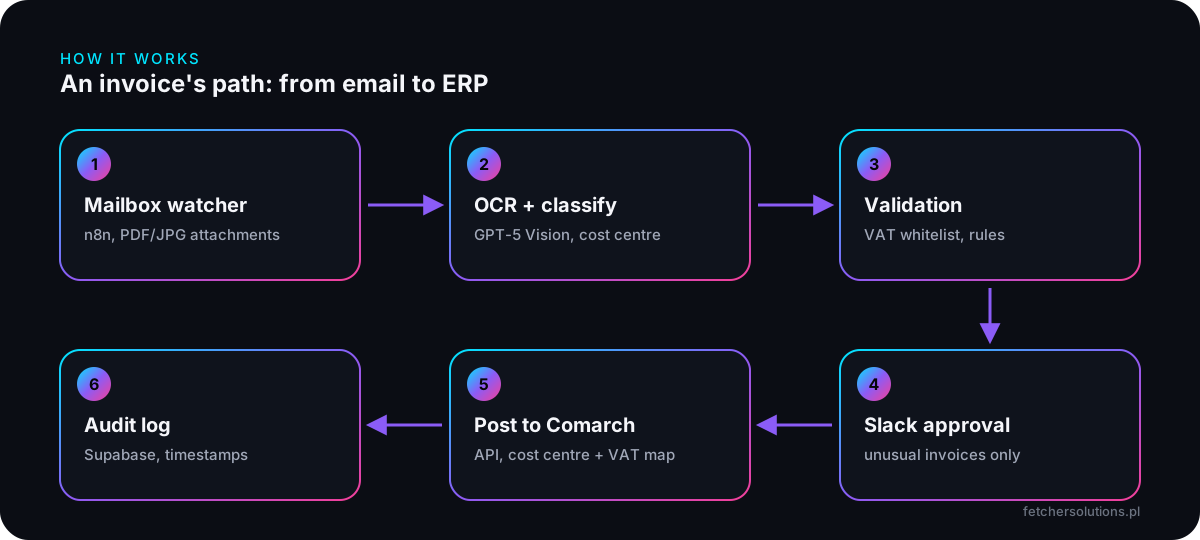
How does the AI accounting agent work, step by step?
The agent has six stages: mailbox monitoring in n8n, reading and classification by GPT-5 Vision, validation against the VAT whitelist and the Comarch database, an approval queue in Slack, posting to Comarch via API, and an audit log in Supabase. Most invoices pass through the whole path without human involvement.
1. Mailbox watcher (n8n)
n8n monitors a dedicated invoice address and extracts PDF and JPG attachments. Suppliers don't need to change anything — they send invoices exactly as before.
2. OCR + classification (GPT-5 Vision)
The model extracts the supplier's tax ID, invoice number, date, net/VAT/gross amounts and line items, and proposes a cost centre. Unlike classic template-based OCR, it copes with invoices in any layout.
3. Validation
A cross-check against the Polish VAT whitelist (Ministry of Finance API), the supplier database in Comarch and company rules. This layer turns “the model read it this way” into “the data checks out”.
4. Approval queue in Slack
Unusual invoices — a new supplier, an amount above 10k, or a tax ID missing from the whitelist — go to an approval queue in Slack. An accountant approves with one click without opening another system.
5. Post to Comarch
Data is posted to Comarch Optima via API, with automatic cost-centre and VAT-rate mapping.
6. Audit log
Every agent decision is logged in Supabase with timestamps. You can see what the agent read, what it checked and why an invoice went straight through or to approval.
Why n8n, GPT-5 Vision and Supabase?
n8n is the process backbone, GPT-5 Vision is the brain that understands the document, and Comarch, the VAT whitelist, Slack and Supabase provide control and accountability. It's our standard pattern: the workflow executes steps, the language model makes decisions where rules alone fall short.
- n8n — orchestration, retries and integrations without writing everything from scratch.
- GPT-5 Vision — reads invoices in any format, including scans and photos.
- VAT whitelist — the official source for verifying suppliers in Poland.
- Slack — approvals where the team already works.
- Supabase — a durable, searchable decision log.
How an AI agent differs from classic automation is covered in 10 processes you'll automate with AI agents.
What did the AI agent deliver after 4 months?
After 4 months, 1.5 FTE moved to higher-value work, the error rate fell from 4% to 0.3%, time per invoice dropped from about 4 minutes to 8 seconds, and the investment paid back in the 4th month — pure savings from then on.
| Metric | Before | After 4 months |
|---|---|---|
| Time per invoice | approx. 4 min | 8s |
| Errors | 4% | 0.3% |
| Team time on data entry | 60% of 3 accountants' time | 1.5 FTE freed |
| ROI | — | payback in month 4 |
The biggest change is structural: invoice volume is no longer tied to headcount. The company can grow while accounting focuses on analysis and exceptions instead of retyping.
Who is a similar project right for?
This makes sense for companies that key hundreds of purchase invoices into an ERP by hand every month, where accounting headcount grows with document volume. The more repetitive invoices you process, the faster the payback.
A document OCR AI agent starts from €2,800 and an ERP integration from €1,060. Details on our AI agents and system integrations pages.
„FETCHER built us an invoice automation that saved so much time that one bookkeeper now does what three used to do. ROI in 4 months — counted, not "felt".”
Marta K. · CFO · manufacturing · Poland
Is your accounting team stuck retyping invoices?
A 30-minute call — we'll estimate your savings potential and show the architecture for your company.
Book a free consultation →Frequently asked questions
How much does an AI invoice agent cost?
A document OCR AI agent starts from €2,800, and an ERP integration from €1,060. In this project the investment paid back in 4 months. You get a fixed-price quote after a 30-minute discovery call.
Can AI handle invoices in different formats?
Yes. GPT-5 Vision reads PDF and JPG invoices in any layout, with no templates. The data is then validated against the VAT whitelist, the supplier database in the ERP and company rules.
What happens to invoices the agent isn't sure about?
They go to an approval queue in Slack — for example a new supplier, an amount above 10k or a tax ID missing from the whitelist. A person decides, and every agent step is recorded in the audit log.
Does this only work with Comarch Optima?
This project ran on Comarch Optima, but the architecture — watcher, OCR, validation, approval, push to ERP — stays the same for other systems. We also integrate Subiekt GT and other ERPs with an API.