TL;DR
- Single workflow from €600; AI deployments from €2,800; full AI-agent implementations from €7,000
- n8n, Make or Zapier as the skeleton, GPT-5 or Claude as the decision layer when rules aren't enough
- Fixed-price offer within 48 hours of a free 30-minute discovery call
- Invoice handling cut from 4 minutes to 8 seconds per document in one of our deployments
What does a business process automation agency actually do?
A business process automation agency maps a repetitive task, decides which steps a machine can own, then builds and maintains the workflow that does it. At FETCHER Solutions that means connecting your existing tools with n8n, Make or Zapier, adding an AI decision layer where needed, and handing over documented, monitored automations.
The deliverable is not a diagram or a slide deck. It is a running workflow that reacts to real events: a new order, an email with a PDF attached, a lead submitting a form, a ticket landing in your helpdesk. Typical areas we automate:
- Orders – order confirmation, stock checks, shipping labels, status emails.
- Invoices – collecting attachments, reading them, posting them to accounting.
- Leads – enrichment, scoring, routing to the right sales rep, follow-ups.
- Support – tagging, prioritising and answering first-line tickets.
- Reporting – weekly numbers pulled from several systems into one dashboard.
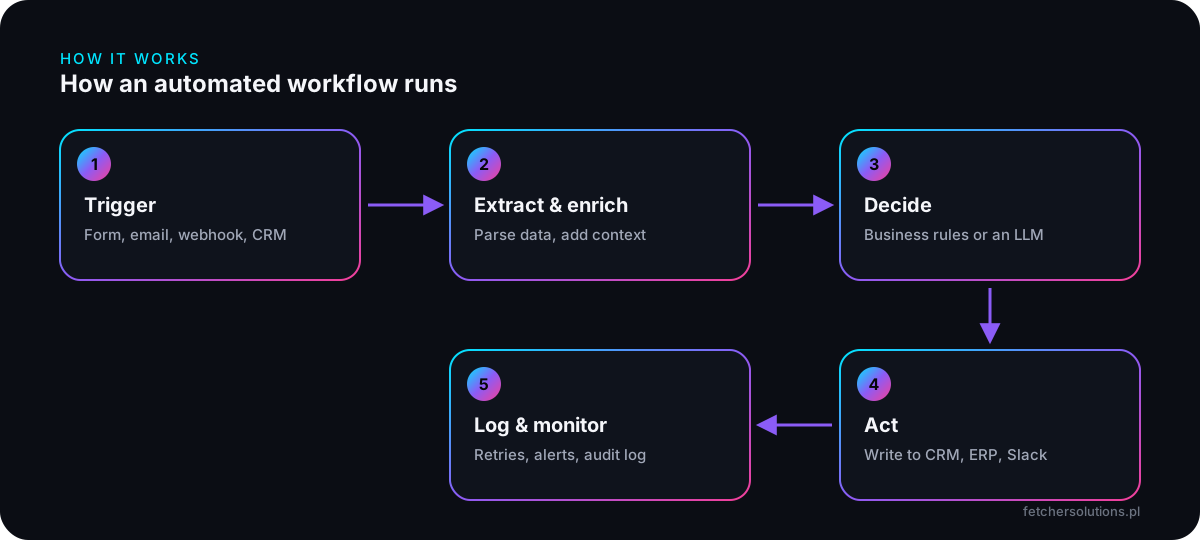
We price each workflow as a fixed project, so you know the cost before a single node is built. Where it makes sense we also add the boring but vital parts: retries when an API times out, alerts when something fails, and a log of every run so you can see exactly what happened and when.
Which processes should you automate first?
Start with processes that are frequent, rule-heavy and painful when they go wrong. A good first candidate runs dozens of times a week, follows the same steps each time, and currently involves someone copying data between two screens. Those workflows pay back fastest and are the easiest to test.
During the discovery call we score candidates on three questions:
- Volume – how many times a week does it happen, and how long does each run take by hand?
- Error cost – what does a typo cost: a wrong price, a missed lead, a late payment?
- Stability – are the steps the same every time, or do they need judgement?
High volume plus stable steps means a classic workflow. High volume plus judgement – reading invoices in any layout, understanding what a customer wants – means an AI agent sits inside the workflow. Low volume usually means it is not worth automating yet, and we will tell you so. A five-minute task done twice a month rarely justifies a build, maintenance and monitoring.
Our business process automation guide walks through how to calculate ROI before you commit any budget.
n8n, Make or Zapier – which tool should run your workflows?
We pick the tool per project, not per habit. Zapier is fastest for simple app-to-app links, Make handles visual multi-branch scenarios well, and n8n is our default for complex or data-sensitive workflows because it can be self-hosted and extended with custom code. All three are stable, mainstream platforms.
| Tool | Best for | Watch out for |
|---|---|---|
| Zapier | Quick links between popular SaaS apps | Per-task pricing grows with volume |
| Make | Visual scenarios with branches and loops | Large scenarios get hard to read |
| n8n | Complex logic, custom code, self-hosting | Needs someone to maintain the instance |
For EU companies with strict data policies, self-hosting matters: n8n can run on your own server or an EU cloud, so customer data stays in infrastructure you control. Where a workflow needs a database, we add Supabase or Postgres rather than stretching a spreadsheet past its limits.
Whichever tool we choose, you get admin access, the workflow exports and written documentation. Nothing is locked to our accounts.
When does a workflow need AI rather than fixed rules?
Add AI when the input is unpredictable. Fixed rules work when data arrives in a known format; they break when every supplier sends a different invoice layout or every customer phrases a request differently. An LLM such as GPT-5 or Claude reads the input, extracts what matters and makes a decision the workflow then executes.
In practice we combine both layers. n8n or Make remains the skeleton – triggers, API calls, retries, logging – and the language model is called only at the step that needs judgement. That keeps costs predictable and the behaviour easy to audit.
Examples of decisions we hand to the AI layer:
- Classifying an incoming email as an order, a complaint or spam.
- Reading an invoice and proposing the cost centre and VAT rate.
- Scoring a lead from 1 to 100 based on company, size and stated intent.
Unusual cases go to a person: we route them to a Slack approval queue instead of letting the model guess. If your process is mostly judgement, see our AI agent development page for how we build fully agentic systems.
What results have our automations delivered?
Two deployments show the range. For a 50-person manufacturer in Łódź we automated cost-invoice processing into Comarch Optima, and for a B2B SaaS company we built an AI-scored lead pipeline in HubSpot. Both are documented as case studies with before-and-after numbers.
Invoice automation. Three accountants were spending 60% of their time keying in roughly 300 invoices a month. An n8n mailbox watcher now collects attachments, GPT-5 Vision extracts the data, the workflow validates it and posts it to the ERP. Processing time fell from about 4 minutes to 8 seconds per invoice, errors from 4% to 0.3%, and the project paid for itself in the fourth month. Details: AI accounting automation.
Lead pipeline. With 200+ leads a month, sales reps were qualifying by hand. Each new HubSpot lead is now enriched, scored by Claude, routed and followed up automatically. Over three months: +47% sales-qualified leads and 62% less rep time spent on manual qualification. Details: B2B CRM automation.
“FETCHER built us an invoice automation that saved so much time that one bookkeeper now does what three used to do. ROI in 4 months — counted, not “felt”.” – Marta K., CFO, manufacturing, Łódź
How does an automation project run with FETCHER?
Every project follows our FETCH framework: Focus, Explore, Transpose, Commit, Handoff. You start with a free 30-minute call, receive a technical brief and fixed price within 48 hours, watch the build in two-week sprints, and launch with a 30-day warranty. Most automation projects fit within 2–8 weeks.
- Focus – a 30-minute Google Meet call to map the process, KPIs, current stack and budget. You get a written summary.
- Explore – within 48 hours: architecture, sprint timeline and a fixed-price offer that does not move.
- Transpose – two-week build sprints, daily progress in Notion, a demo at the end of each sprint and feedback turned around in under 24 hours.
- Commit – launch with a checklist that includes GDPR, plus a 30-day warranty.
- Handoff – documentation, credentials and training, so your team understands what runs where.
Need someone to watch the workflows afterwards? Care plans start at €160/mo and cover monitoring, fixes and a set number of dev hours.
Can a Polish agency automate processes for a company in Germany or the Netherlands?
Yes. Our headquarters is in Łódź, but we work with clients in Germany, the UK, the Netherlands, Austria and the Czech Republic. The process is fully remote by default – Google Meet, Slack and Notion – with on-site visits when a project genuinely needs them. Invoices are EU-compliant with reverse-charge VAT for B2B.
Working across borders changes little in the workflows themselves. n8n, Make and Zapier connect to the same SaaS tools wherever you operate, and AI models handle English, German and Polish documents. What we check early is local systems: your accounting software, your carriers, your CRM, and any data-residency rules your company follows.
Business hours overlap fully with Central European Time, and we reply to emails in under 4 hours during the working day. If a workflow breaks, Care clients get a response in under 2 hours during business hours, or 24/7 on an SLA plan.
How much does business process automation cost?
A single automated workflow starts at €600, for example lead handling from a web form into your CRM. AI deployments with document reading or decision-making start at €2,800, and full AI-agent implementations covering accounting, sales or supply chain start at €7,000. Every quote is fixed-price after a free 30-minute call.
| Scope | Price | What's included |
|---|---|---|
| Python/Node script | from €50 | One-off automation: CSV parsing, reports, data transformation; 24–72 h turnaround |
| Simple API integration | from €85 | Two systems connected via webhook or simple mapping |
| Single workflow (n8n/Make) | from €600 | One end-to-end process, tested, documented, with error alerts |
| AI deployment | from €2,800 | Workflow with an LLM decision layer, e.g. document OCR and classification |
| Growth package | from €3,500 | Includes 3 workflow automations alongside a website or Shopify build |
| Scale · AI | from €7,000 | Custom AI agents, ERP/CRM integration, 24/7 SLA, 6-month roadmap |
| Care plan | from €160/mo | Monitoring, fixes and dev hours after launch |
Fixed price agreed in the brief. If the scope changes mid-project, we stop, price the change request separately and continue only after your approval.
Map your first automation in 30 minutes.
Book a free call and leave with a written map of what to automate, a rough quote and a recommended stack – even if we never work together.
Book a free consultation →Frequently asked questions
How quickly can a single workflow go live?
A single workflow is usually one of the smallest projects we run. The exact timeline is set in the brief you receive within 48 hours of the discovery call, and our build sprints last two weeks. Urgent micro-tasks, such as a one-off script, have a 24–72 hour turnaround.
Do we need to switch our existing tools?
No. Automation connects what you already use – CRM, ERP, helpdesk, email, spreadsheets – through APIs and webhooks. We only suggest replacing a tool if it has no way to exchange data, and you decide whether that change is worth it.
Who owns the workflows once they are built?
You do. Workflows run in accounts or on servers registered to your company, and at handoff you receive all credentials, workflow exports and documentation. Nothing is vendor-locked, so another team could maintain the automations later if you wanted. We also run a short training session at handoff.
What if a workflow breaks after launch?
Every project includes a 30-day warranty covering bugs not caused by later changes on your side. After that, Care plans from €160/mo add uptime monitoring, security updates and dev hours, with a response time under 2 hours during business hours.
Can you invoice a company outside Poland without Polish VAT?
Yes. FETCHER Ziemowit Galant is registered for EU VAT (PL9472012475), so B2B clients in other EU countries receive invoices under the reverse-charge mechanism. Invoices are issued on the payment date, or as a proforma beforehand, in PDF, alongside an e-invoice in our accounting system.
Is our data safe in an automated workflow?
We design for least access: each workflow gets only the permissions it needs, credentials stay in your accounts, and the launch checklist includes GDPR. For sensitive data we can self-host n8n so information never passes through a third-party automation cloud.